Top 5 Editorial Picks

Five current fishfinders chosen for distinct buyer needs—from compact value to a premium expandable system. These are editorial selections, not Amazon or reader ratings.

As an Amazon Associate I earn from qualifying purchases.

  1. 1
    Garmin Striker Vivid 4cv Fishfinder with Transducer - 4-inch LCD Display - Easy-to-Use Scanning Sonar - Color Palettes, 11.2 Ounces (010-02550-00) | Transducer, 4-inch LCD Display, Easy-to-Use Scanning Sonar, Color Palettes, 11.2 Ounces 4 Inch STRIKER Vivid 4cv Transducer

    Best Compact Value

    Garmin STRIKER Vivid 4cv

    A straightforward sonar and GPS unit for kayaks, jon boats, and small boats.

    • CHIRP and ClearVü scanning sonar in a compact package
    • A sensible pick when you do not need a chartplotter or SideVü
    • Best fit for budget-conscious small-boat anglers
  2. 2
    Garmin Striker Vivid 7sv, Easy-to-Use 7-inch Color Fishfinder and Sonar Transducer, Vivid Scanning Sonar Color Palettes (010-02553-00) | Easy-to-Use 7-inch Color Fishfinder, Sonar Transducer, Vivid Scanning Sonar Color Palettes 010-02553-00 7 Inch STRIKER Vivid 7sv Transducer

    Best All-Around 7-Inch Fishfinder

    Garmin STRIKER Vivid 7sv

    A capable sonar-first choice for anglers who want a useful 7-inch display without moving into a full chartplotter system.

    • CHIRP, ClearVü, and SideVü sonar for fish and structure
    • Simple setup with a practical 7-inch screen
    • Strong value for most general boat anglers
  3. 3
    Garmin ECHOMAP UHD2 73sv with GT54 Transducer, 7” Touchscreen Chartplotter, Garmin Navionics+ U.S. Inland 7' Garmin Navionics+ U.S. Inland with GT54 Transducer

    Best GPS & Chartplotter Upgrade

    Garmin ECHOMAP UHD2 73sv

    The mapping step-up for buyers who need confident navigation as well as high-quality scanning sonar.

    • Garmin Navionics+ U.S. Inland mapping and touchscreen control
    • Ultra High-Definition ClearVü and SideVü sonar
    • A better fit than STRIKER when charts matter
  4. 4
    Humminbird XPLORE Series GPS Fish Finder MEGA Side Imaging+ & HD Touchscreen Display Transducer Included) 9-Inch Display

    Best Side-Imaging Upgrade

    Humminbird XPLORE 9

    A current 9-inch imaging platform for anglers ready to build around serious side imaging and boat integration.

    • MEGA Side Imaging+ and MEGA Down Imaging+
    • 9-inch display with touchscreen and keypad control
    • Recommended configuration: 9-inch, transducer included
  5. 5
    Lowrance HDS PRO Fishfinder/Chartplotter with Smartphone Integration and Preloaded C-MAP U.S. & Canada Charts 10 Inch ActiveImaging HD 3-in-1

    Best Premium Expandable System

    Lowrance HDS PRO 10

    A larger-boat platform for buyers who want premium sonar, mapping, networking, and a serious expansion path.

    • Active Imaging HD and C-MAP charting
    • Wide networking support for integrated electronics
    • Ready to expand with ActiveTarget 2 and the Lowrance ecosystem

Icom M424 Review

The Icom M424 marine VHF radio is the latest fixed mount entry from this well-known marine electronics maker to hit the market. This boat radio features basic VHF functionality as well Class D DSC capabilities, noise cancelling circuitry, and introduces a new Icom user interface.

The M424 ships with the radio and attached microphone, a plastic tilt bracket suitable for both overhead and dashboard mounting, a fused power cable, metal microphone holder, and an instruction manual.
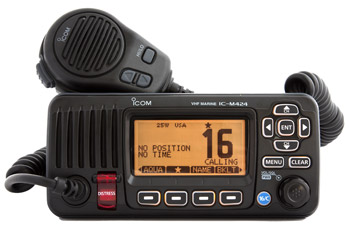
icom m424 marine vhf radio

Icom M424.

To flush mount this radio you’d have to improvise your own mounting system or purchase the Icom MB-132 flush mounting kit.

Leads extending from the back panel of this Icom marine VHF radio let you connect to an external speaker, PA speaker, and other NMEA0183 compatible devices.

The radio face measures 7-inches wide by 3.3-inches high. The radio housing extends less than 4.5-inches from the front panel back, which is where the radio would contact the panel in a flush mount setup. A flush mount step approximately a quarter inch wide runs around the face back.

Controls and Operation

This radio, officially known as the Icom IC-M424, has one knob located on the bottom right of the front panel as well as 13 pushbuttons. The single knob turns the radio on/off and controls volume and squelch settings. Channel selection is made with up/down arrow keys located both on the radio front panel and the microphone.

Two dedicated pushbuttons offer single press control for quick selection of channel 16 or a predetermined call channel and sending of a DSC distress call. You will also find four soft keys, and a menu, clear, and enter key.

Oft used controls are selected with one of the four soft keys. Arrow keys let you scroll the functions as needed. Any of up to 14 functions can be accessed via a soft key. These include setting transmit power level, switching to weather channels, several scan functions, setting the receiver to local or distant, as well as others. Full access to DSC calling options, DSC settings, other radio settings, and certain configuration items are found in the main menu.

Connectivity

The M424 will interface with a variety of gear using a NMEA0183 interface including a GPS and the Icom MA-500TR Class B AIS unit. When connected to this AIS the M424 is able to call an AIS target without the need to manually enter the MMSI number. When connected to a GPS the radio will display present position, date, and time.

Icom M424—Added Features

This radio will connect to and power an external speaker and connect to a PA speaker. With the appropriate PA speaker connected you will have full hailer capabilities including listen back on the radio internal speaker and a manual foghorn mode.

The M424 has an Icom exclusive called AquaQuake which uses a low tone burst though the radio speaker to clear any accumulated water. Water in the speaker could muffle the output and reduce voice clarity of incoming radio calls.

The M424 has a built-in low voltage alarm that displays a battery icon onscreen if input voltage drops below approximately 11 volts. Raising the voltage above about 11.5 volts resets the alarm to off. There is no audible warning associated with this alarm. The M424 continued to function with input voltages as low as 9.5 volts. In a situation where vessel electrical power is waning this could give you a shot at making or receiving voice communication when all other gear has failed.

Buy this Icom marine VHF radio here.

The M424 is rated waterproof to IPX7 standards which means the radio could be submerged to a depth of one meter for 30 minutes without sustaining damage.

Performance

Icom marine VHF radios are well-known for their efficient transmitters. The new Icom M424 does not have the most efficient transmitter I have tested but it was still does well by drawing 4.4 amps while transmitting at full power and .9 amps at its low power setting.

I am giving the receiver sensitivity and channel separation good ratings based on the factory specifications listed in the instruction manual. Audio output was a respectable 91 dBA with volume at maximum while listening to a weather broadcast. While listening at these high volume settings voice distortion of the broadcast was minimal. Overall I am giving the Icom M424 audio system a good rating.

This Icom VHF boat radio has a massive 3-inch monochrome full-dot matrix display screen. Channel numbers display at nearly an inch in height on the right side of the screen with channel name below. Channel names can be changed if desired. The left two-thirds of the screen space is designated for position and time display when the radio is connected to a GPS.

Top row labels indicate when the radio is transmitting or receiving, transmitter power setting, channel group, and GPS status as well as several other tidbits of information. The bottom row display soft key labels that can be scrolled with the left/right arrow keys. Backlight settings are made by selecting BKLT from the soft key menu and then adjusting a slider as desired.

Scanning

The Icom M424 can be set to scan for weather alerts, and scan in priority or normal modes. Priority scan always check channel 16 between other channels while normal follows a sequential order. As the names imply, Dual Watch or Tri-Watch scan modes monitor two and three channels respectively. Channel 16 is always one of the monitored channels in these modes. With the new Icom VHF radio interface you will find favorite channels can be added or removed from the scan list with a single press of the star icon labeled soft key.

Digital Selective Calling

The Icom M424 is rated as a Class D radio, which means it has two built-in receivers, one for voice communications and one for digital communications. Channel 70 is the designated channel for digital calling and is continuously monitored for any incoming DSC calls.

Before you can use any DSC functions you must enter your MMSI number. Penalties for improper DSC use have increased significantly so make sure you enter your MMSI number promptly upon receipt.

Buy this Icom marine VHF radio here.

With your MMSI number properly entered the M424, when connected to a GPS, will allow you to make a variety of DSC calls, including a distress call, which transmits your vessel information and position data. The M424 will store up to 100 MMSI numbers with up to 10 character name associated with each.

Final Thoughts

The Icom M424 is a mid-priced marine VHF radio with all the basic features you would expect. Highlights include a huge crisp display screen and hailer capabilities. This marine VHF radio should be another hit from marine electronics maker Icom.